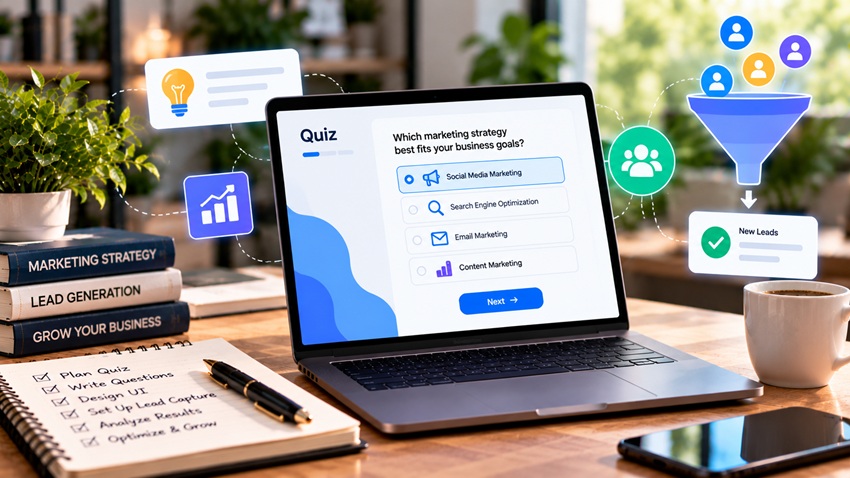
A lead generation quiz turns visitors into qualified leads by offering personalized answers in exchange for a few clicks and an email address. To design one that works: pick a quiz type tied to your offer (product recommender, assessment, personality, or knowledge quiz), write a curiosity-driven title, keep it to about 5–10 easy questions with visual answer options, ask for contact details just before showing results with a clear value promise, deliver genuinely useful personalized results with a next step, tag leads by their answers, and follow up with segmented emails. Quizzes work because they're interactive, feel personal, and collect zero-party data — information people choose to share — that makes your marketing more relevant. Here's how to build one.
Why Quizzes Work for Lead Generation
- Engagement: interactive content holds attention longer than static forms
- Personalization: results feel tailored, so people are willing to share their email
- Zero-party data: answers reveal needs, preferences, budgets, and goals
- Qualification: responses help sort leads by fit and readiness
- Shareability: fun or insightful results get shared on social media
Content-driven lead capture is covered in lead generation with content marketing.
Types of Lead Generation Quizzes
| Quiz Type | Example | Best For |
|---|---|---|
| Product recommender | "Which skincare routine is right for you?" | E-commerce, product catalogs |
| Assessment / scorecard | "How strong is your website's SEO? Get your score" | B2B services, consultants, SaaS |
| Personality / style | "What's your marketing personality?" | Brand awareness, social sharing |
| Knowledge / trivia | "How much do you really know about retirement planning?" | Education, financial services |
| Readiness / eligibility | "Are you ready to buy your first home?" | Real estate, finance, healthcare |
| Cost or solution finder | "Which plan fits your business?" | SaaS, agencies, insurance |
Assessments and product recommenders usually generate the most qualified leads because results map directly to your offers.
Step 1: Define Your Goal and Outcomes
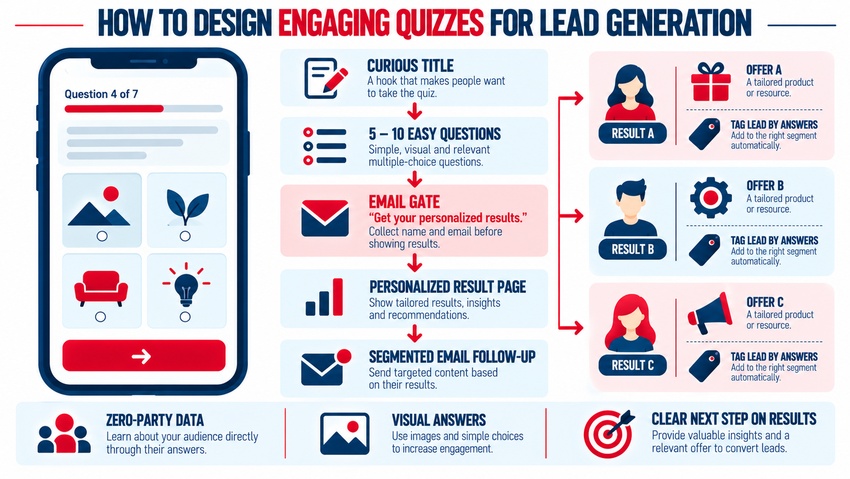
Start with the end: what results will people receive, and what offer will each result lead to? Map three to five outcomes, each tied to a product, service, or content path. For example, an SEO agency's "SEO Health Score" quiz might have outcomes for "Foundation needed," "Growing," and "Ready to scale," each with a tailored recommendation.
Step 2: Write a Compelling Title
Strong titles promise personal insight:
- "What's Holding Your Website Back? Take the 2-Minute Quiz"
- "Find Your Perfect [Product] in 60 Seconds"
- "Score Your Email Marketing: Are You Leaving Money on the Table?"
- "Which [Service] Package Fits Your Business?"
Step 3: Write Easy, Engaging Questions
- Keep it short: about 5–10 questions
- Start easy: simple, fun questions first; qualifying questions later
- Use visuals: image-based answers increase engagement
- One idea per question
- Include qualifying questions: budget range, timeline, company size, role
- Show progress: a progress bar reduces abandonment
Step 4: Place the Lead Capture Strategically
| Gate Placement | Pros | Cons |
|---|---|---|
| Before results (most common) | High lead capture after investment in answering | Some users abandon at the form |
| Optional (results shown, email for detailed report) | Better user experience, more completions | Fewer leads |
| Before quiz starts | Captures intent early | High drop-off |
Explain the value: "Enter your email to get your personalized results and action plan." Keep the form to name and email, plus optional phone for high-intent offers. Add consent language and a link to your privacy policy — see GDPR compliance: what you need to know.
Step 5: Deliver Valuable Results
Results pages should:
- Name the result clearly ("You're a Growth-Stage Marketer")
- Explain what it means in plain language
- Offer specific recommendations or products
- Include proof (testimonials, case studies)
- Present one clear call to action — book a call, shop recommended products, or download a guide
CTA guidance is in writing compelling CTAs for email campaigns.
Step 6: Segment and Follow Up
Tag leads by result and key answers in your email platform or CRM, then send tailored sequences:
- Immediately: results recap and recommended next step
- Day 2: educational content tied to their result
- Day 4: case study or testimonial from a similar customer
- Day 7: offer or consultation invitation
Personalization tips are in how to personalize your emails for maximum engagement, and B2B nurture flows in lead nurturing emails best practices for B2B.
Step 7: Promote Your Quiz
- Feature it on your homepage, blog posts, and exit-intent popups
- Share it on social media with engaging hooks — see how to integrate email with social media campaigns
- Run paid social ads directly to the quiz
- Include it in email newsletters
- Use it at events and trade shows on tablets
Quiz Tools
Popular options include dedicated quiz builders (such as Interact, Outgrow, ScoreApp, Typeform, and Riddle), e-commerce quiz apps for Shopify and WooCommerce, and form builders with logic and scoring. Choose tools that integrate with your email platform and CRM, support branching logic, and provide analytics. Automation integrations are covered in digital marketing automation tools.
Example: A B2B Assessment Quiz
Title: "How Ready Is Your Business for AI-Powered Marketing? Get Your Score"
- How do you currently generate most of your leads?
- Do you use a CRM? (Yes / No / Not sure)
- How often do you publish new content?
- How do you measure marketing ROI?
- What's your biggest marketing challenge right now?
- What's your company size?
- When are you hoping to improve results? (This month / This quarter / Later)
Results: "Getting Started," "Building Momentum," "Ready to Scale," each with tailored tips and a consultation CTA.
Measuring Quiz Performance
| Metric | What It Tells You |
|---|---|
| Start rate | How compelling the title and placement are |
| Completion rate | Whether questions are engaging and easy |
| Lead capture rate | Effectiveness of the gate and value promise |
| Result page CTA click rate | Strength of recommendations |
| Lead-to-customer rate by result | Which outcomes produce the best customers |
| Revenue per quiz lead | Overall business impact |
Common Mistakes
- Too many questions or complicated wording
- Generic results that feel like a sales pitch
- Asking for too much information in the form
- No follow-up or segmentation after capture
- Results that don't connect to an offer
Key Takeaways
- Quizzes generate leads by offering personalized insights in exchange for contact details.
- Choose quiz types tied to your offers, such as product recommenders or assessments.
- Keep questions short, visual, and easy, with qualifying questions near the end.
- Gate results with a clear value promise and deliver genuinely helpful outcomes.
- Tag leads by answers, follow up with segmented emails, and measure every stage.
Frequently Asked Questions
Why are quizzes effective for lead generation?
Quizzes are interactive and personalized, which makes people more willing to share their contact information in exchange for results. They also collect zero-party data about preferences and needs, helping businesses segment and qualify leads.
How many questions should a lead generation quiz have?
Most effective quizzes have about 5 to 10 questions. This keeps the experience quick and engaging while collecting enough information to personalize results and qualify leads.
Should I ask for an email before showing quiz results?
Many businesses ask for an email just before revealing results, which typically captures more leads. Clearly explain the value, such as a personalized report, and keep the form short. Optional gates improve completion but capture fewer leads.
What type of quiz generates the best leads?
Assessment or scorecard quizzes and product recommendation quizzes usually generate the most qualified leads because results connect directly to specific services or products and reveal the user's needs and readiness.
How do I follow up with quiz leads?
Tag leads by quiz result and key answers in your email platform or CRM, then send a segmented sequence: results recap, educational content, relevant case studies, and a tailored offer or consultation invitation.
Want a quiz that turns visitors into qualified leads? AiScope Digital's content marketing services and email marketing services design, build, and automate interactive lead-generation funnels — get a free consultation today.