To implement HTTPS on your website, obtain an SSL/TLS certificate (often free through your host or Let's Encrypt), install and activate it on your server, update your site URLs to HTTPS, set up permanent 301 redirects from HTTP, fix mixed-content warnings, enable HSTS once everything works, and update Google Search Console, analytics, sitemaps, and internal links. HTTPS encrypts data between visitors and your site, protects logins and payments, prevents browser "Not secure" warnings, and is a lightweight Google ranking signal. Here's the complete step-by-step process.
SSL, TLS, and HTTPS Explained
- SSL (Secure Sockets Layer) is the original encryption protocol; it's outdated, but "SSL certificate" remains the common name
- TLS (Transport Layer Security) is the modern protocol used today (TLS 1.2 and 1.3)
- HTTPS is HTTP over TLS — the secure version of web traffic, shown by
https://and a padlock or similar indicator in browsers
A certificate verifies your domain and enables encrypted connections.
Why HTTPS Matters
| Benefit | Why It Matters |
|---|---|
| Encryption | Protects data like passwords, form entries, and payment details |
| Trust | Browsers mark HTTP pages as "Not secure," especially with forms |
| SEO | HTTPS is a lightweight ranking signal and part of page experience |
| Modern features | Many browser features, such as service workers and geolocation, require HTTPS |
| Performance | HTTP/2 and HTTP/3 are typically used over HTTPS, improving speed |
| Compliance | Supports PCI DSS for payments and data protection obligations |
| Referral data | Secure-to-secure traffic preserves referrer information more reliably |
Types of SSL/TLS Certificates
| Validation Level | What's Verified | Best For |
|---|---|---|
| Domain Validated (DV) | Control of the domain | Most websites, blogs, small businesses |
| Organization Validated (OV) | Domain plus organization details | Businesses wanting additional verification |
| Extended Validation (EV) | Extensive business verification | Organizations with strict requirements |
| Coverage | What It Secures |
|---|---|
| Single-domain | One domain (e.g., example.com and often www) |
| Wildcard | A domain and all first-level subdomains (*.example.com) |
| Multi-domain (SAN) | Multiple different domains on one certificate |
For most small business websites, a free DV certificate from Let's Encrypt or your hosting provider is sufficient. Modern browsers no longer display special EV indicators prominently, so EV mainly matters for specific compliance needs.
Step 1: Get a Certificate
- Through your host: many hosts offer free one-click SSL (often Let's Encrypt) with automatic renewal
- Through Cloudflare or a CDN: edge certificates encrypt traffic between visitors and the CDN; configure Full (strict) mode so traffic to your origin server is also encrypted
- From a certificate authority: purchase OV/EV or special certificates if needed
Step 2: Install and Activate the Certificate
Most hosting control panels install certificates automatically. On self-managed servers, tools like Certbot install Let's Encrypt certificates and configure auto-renewal for Apache or Nginx. Verify installation by visiting https://yourdomain.com and using an SSL checker.
Step 3: Update Your Site to HTTPS
- WordPress: update the WordPress Address and Site Address to HTTPS in Settings > General, then update internal URLs in the database with a search-replace tool
- Other CMSs and custom sites: update base URLs, configuration files, and hard-coded links
- Update canonical tags, hreflang tags, and structured data to HTTPS URLs
Step 4: Redirect HTTP to HTTPS With 301 Redirects
Set server-level permanent redirects so every HTTP URL goes to its HTTPS equivalent, ideally in one hop. Also choose a preferred host (www or non-www) and redirect the other to it. Avoid redirect chains like HTTP → HTTPS → www → final. Most hosts provide a "Force HTTPS" option; otherwise use server configuration rules.
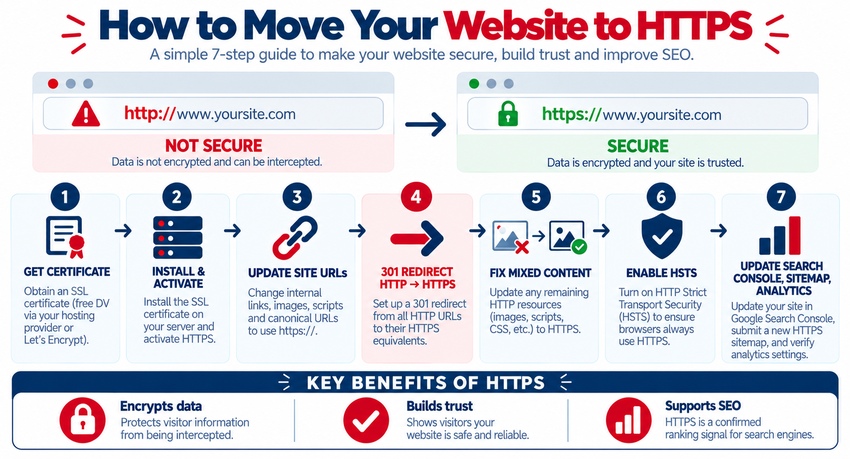
Step 5: Fix Mixed Content
Mixed content occurs when an HTTPS page loads resources (images, scripts, stylesheets, fonts, iframes) over HTTP. Browsers may block these resources or show warnings. To fix:
- Use browser developer tools to find mixed-content errors
- Update hard-coded
http://URLs in content, themes, and plugins - Update CDN and third-party embed URLs
- Use relative or protocol-correct URLs where appropriate
- Optionally add a
Content-Security-Policy: upgrade-insecure-requestsheader as a safety net
Step 6: Enable HSTS
HTTP Strict Transport Security tells browsers to always use HTTPS for your site, preventing downgrade attacks. Add the Strict-Transport-Security header with a short max-age first, confirm everything works, then increase it. Consider HSTS preload only when you're certain every subdomain supports HTTPS. Related security headers are covered in top 10 web security practices every developer should know.
Step 7: Update SEO and Analytics Settings
- Google Search Console: add or verify the HTTPS property (a domain property covers all protocols and subdomains)
- XML sitemap: list HTTPS URLs and resubmit
- robots.txt: confirm sitemap URLs use HTTPS
- Google Analytics 4: update the data stream URL if needed
- Ad platforms, email links, social profiles, and directory listings: update to HTTPS
- Monitor indexing and rankings for several weeks
Technical SEO checks are covered in 10 technical SEO tips to boost your site's performance.
Step 8: Automate Renewal and Monitoring
Let's Encrypt certificates are short-lived and should renew automatically; commercial certificates also expire. Set up auto-renewal, expiry alerts, and periodic checks with SSL testing tools so your site never displays an expired-certificate warning. DNS settings related to certificates and domains are covered in DNS management: how to configure your domain.
HTTPS Migration Checklist
| Task | Done When |
|---|---|
| Certificate installed | HTTPS loads without warnings |
| Site URLs updated | CMS and config use HTTPS |
| 301 redirects | All HTTP URLs redirect in one hop |
| Mixed content fixed | No console warnings |
| Canonicals and schema | Reference HTTPS URLs |
| HSTS enabled | Header present after testing |
| Search Console | HTTPS or domain property verified |
| Sitemap | HTTPS URLs submitted |
| Renewal | Auto-renew and alerts configured |
Why certificates matter more broadly is explained in the importance of SSL certificates for your website.
Key Takeaways
- HTTPS encrypts data, builds trust, supports SEO, and enables modern web features.
- A free Domain Validated certificate is sufficient for most websites.
- Install the certificate, update URLs, and 301-redirect all HTTP traffic to HTTPS.
- Fix mixed content, enable HSTS carefully, and update SEO and analytics settings.
- Automate renewals and monitor certificates to avoid expiry warnings.
Frequently Asked Questions
What is the difference between SSL and HTTPS?
SSL was the original protocol for encrypting web connections, and TLS is its modern successor. HTTPS is the secure version of HTTP that uses TLS encryption. The term "SSL certificate" is still commonly used for the TLS certificates that enable HTTPS.
Is SSL free?
Yes, many websites can use free SSL/TLS certificates from Let's Encrypt, often provided automatically by hosting companies and CDNs. Paid certificates are available for organization validation, extended validation, special coverage needs, or additional support and warranties.
Does HTTPS improve SEO?
HTTPS is a lightweight Google ranking signal and part of page experience. It also prevents browser security warnings that discourage visitors and supports faster protocols like HTTP/2. While HTTPS alone won't guarantee rankings, it's a baseline requirement for modern websites.
What is mixed content?
Mixed content happens when a page loaded over HTTPS includes resources such as images, scripts, or stylesheets loaded over insecure HTTP. Browsers may block these resources or display warnings. Fix it by updating all resource URLs to HTTPS.
Will switching to HTTPS affect my rankings?
A properly executed HTTPS migration with one-step 301 redirects, updated canonicals, sitemaps, and internal links usually has minimal long-term ranking impact, though temporary fluctuations can occur. Monitor Search Console after the switch to catch crawl or indexing issues.
Need a secure, fast website set up correctly? AiScope Digital's website development and design services handle SSL setup, HTTPS migrations, security headers, and performance optimization — get a free website audit today.