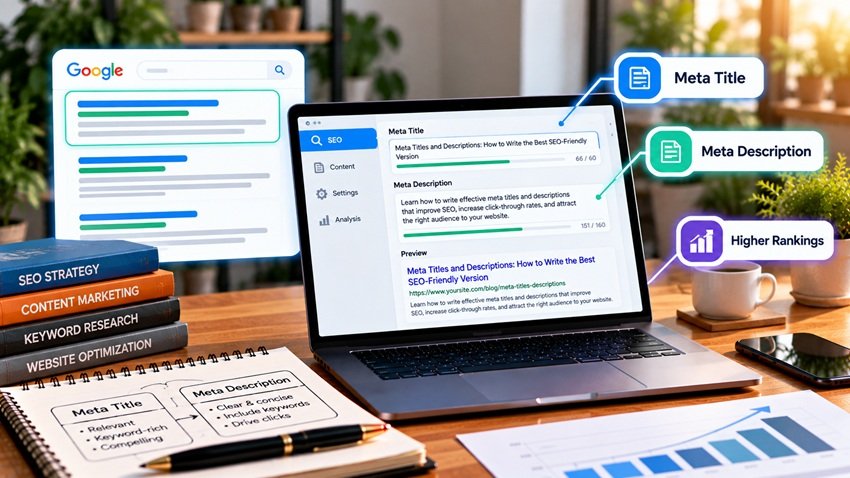
The best meta title is a clear, specific label for the page, about 50–60 characters long, with the main keyword near the front and a reason to click. The best meta description is a one- or two-sentence summary of about 140–160 characters that matches search intent, includes the keyword naturally, and ends with a benefit or call to action. Titles are a confirmed ranking signal and the biggest factor in click-through rate. Descriptions don't directly affect rankings, but they shape whether people click — and AI search tools often use both to understand what a page covers. Here's how to write them well, with formulas, examples, and a checklist.
What Are Meta Titles and Meta Descriptions?
| Element | HTML | Where It Appears | Ranking Impact |
|---|---|---|---|
| Meta title (title tag) | <title>Page Title</title> |
Search result headline, browser tab, social shares (fallback) | Yes — a relevance signal |
| Meta description | <meta name="description" content="..."> |
Snippet text under the search result | No direct impact, but affects CTR |
Both live in the page's <head>. In WordPress, you set them with an SEO plugin such as AIOSEO, Yoast, or Rank Math. Titles are one part of on-page optimization — see mastering on-page SEO: the complete guide.
Length Guidelines for 2026
Google truncates by pixel width, not characters, so these are practical targets:
| Element | Target Length | Why |
|---|---|---|
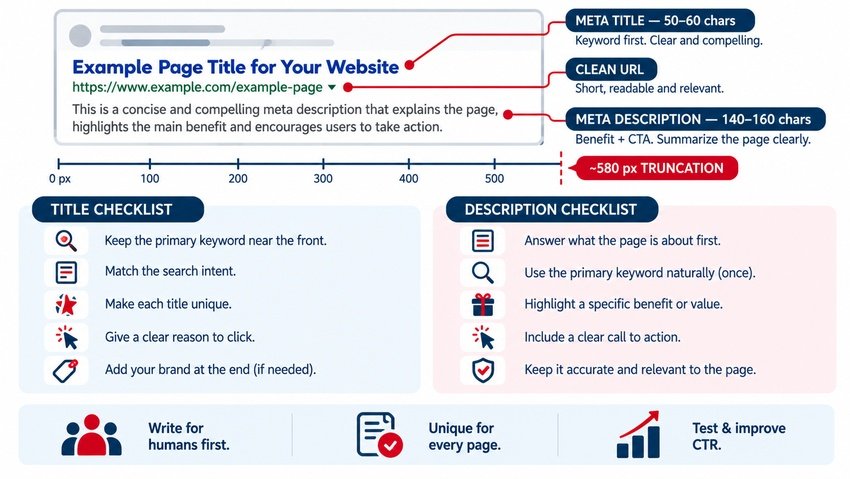
| Meta title | 50–60 characters (~580 px) | Longer titles get cut off with "…" |
| Meta description (desktop) | 140–160 characters (~920 px) | Fits most desktop snippets |
| Meta description (mobile) | Put key info in the first ~120 characters | Mobile snippets are often shorter |
Wide letters such as "W" and "M" take more space than "i" or "l", so preview your snippet with a SERP preview tool before publishing.
How to Write a Great Meta Title
1. Put the Primary Keyword Near the Front
Search engines and readers both weigh the beginning of the title most. "Roof Repair in Fort Lauderdale | Free Estimates" is stronger than "Free Estimates From Our Team for Roof Repair in Fort Lauderdale."
2. Match Search Intent
- Informational: "How to…," "What Is…," "Guide," "Tips"
- Commercial: "Best," "Top," "vs.," "Reviews"
- Transactional: "Buy," "Pricing," "Book," "Get a Quote"
- Local: city or neighborhood names
Intent matching is explained in mastering search intent optimization.
3. Make Every Title Unique
Duplicate titles confuse search engines and make results look the same. Each page should have its own title that describes its own content.
4. Add a Click Reason
Numbers, the current year, benefits, and qualifiers like "Step-by-Step," "Free," or "Checklist" give searchers a reason to choose your result — as long as they're accurate.
5. Use Your Brand Wisely
Add your brand at the end ("| AiScope Digital") on service and home pages where brand recognition helps. On long blog titles, the brand can be dropped to save space.
6. Avoid Keyword Stuffing
"SEO Services, SEO Agency, Best SEO Company, SEO Experts" looks spammy, and Google is more likely to rewrite it.
Meta Title Formulas
- Guide: [Primary Keyword]: The Complete Guide for 2026
- How-to: How to [Achieve Result] in [Timeframe or Steps]
- List: [Number] [Keyword] Tips to [Benefit]
- Service: [Service] in [City] | [Differentiator] | [Brand]
- Product: [Product Name] – [Key Feature] | [Brand]
- Comparison: [Option A] vs. [Option B]: Which Is Better for [Use Case]?
How to Write a Great Meta Description
1. Answer the Query in the First Sentence
Lead with a direct summary of what the page delivers. This also helps AI systems understand the page.
2. Include the Keyword Naturally
Google bolds words matching the query, which draws the eye. Use the keyword once, in natural language.
3. Show a Specific Benefit
Tell searchers what they'll get: "Learn 7 steps," "Compare pricing," "Get a free quote in 24 hours."
4. End With a Call to Action
"Learn how," "See examples," "Book a free consultation," "Shop now."
5. Keep It Accurate
If the description promises something the page doesn't deliver, visitors bounce — and that wastes the click.
Before-and-After Examples
| Page | Weak Version | Improved Version |
|---|---|---|
| Blog post title | "Blog – Email Tips" | "15 Email Marketing Tips to Boost Open Rates in 2026" |
| Service page title | "Home – Services – Company Name" | "Website Design in Fort Lauderdale | Custom Sites | AiScope" |
| Product title | "Product 123" | "Waterproof Hiking Jacket – Lightweight & Packable | Brand" |
| Blog description | "This post is about email marketing." | "Boost opens and clicks with 15 proven email marketing tips — subject lines, timing, segmentation and testing. See the full checklist." |
| Service description | "We offer services. Contact us." | "Custom websites built for speed, SEO and conversions. Get a free design consultation and a quote within 24 hours." |
Why Google Rewrites Titles and Descriptions
Google may replace your title or description with text from the page when it thinks something else better matches the query. Rewrites are more likely when:
- The title is too long, vague, or stuffed with keywords
- The title doesn't match the page's H1 or content
- The description is missing, duplicated, or unrelated to the query
- Boilerplate text appears on many pages
To reduce rewrites, keep titles concise and aligned with your H1, write unique descriptions for important pages, and make sure the opening paragraph clearly summarizes the page.
Meta Tags for AI Search and Social Sharing
AI search tools and answer engines read titles and opening content to understand what a page covers, so descriptive, specific titles help with AI visibility too. For social media, add Open Graph tags (og:title, og:description, og:image) so shares look polished; most SEO plugins add these automatically. Structured data also helps search engines present your page — see maximize schema markup SEO for better rankings.
How to Measure and Improve CTR
- Open Google Search Console's Performance report
- Filter pages with high impressions but low CTR
- Rewrite titles and descriptions for those pages
- Annotate the change date and compare CTR after four to six weeks
- Repeat for your next set of high-impression pages
GA4 helps you see what visitors do after the click — see how to use Google Analytics for SEO — and featured snippet strategies are covered in how to rank for featured snippets.
Common Mistakes
- Missing or duplicate titles across many pages
- Titles over 60 characters that get truncated
- The same description on every page
- Keyword stuffing in either element
- Clickbait that doesn't match page content
- Forgetting to update the year or details on refreshed content
Key Takeaways
- Meta titles are a ranking signal and the main driver of CTR; keep them 50–60 characters with the keyword near the front.
- Meta descriptions don't directly affect rankings but strongly influence clicks; aim for 140–160 characters.
- Match search intent, make each page unique, and include a clear benefit or CTA.
- Reduce Google rewrites by keeping titles aligned with H1s and page content.
- Use Search Console to find low-CTR pages and keep improving them.
Frequently Asked Questions
How long should a meta title be in 2026?
Aim for about 50–60 characters, or roughly 580 pixels, so the title displays fully in Google's results. Put the primary keyword and the most important information near the beginning in case the title is truncated on smaller screens.
How long should a meta description be?
A meta description should usually be about 140–160 characters. Place the most important information in the first 120 characters because mobile results may show less text. Google may also show longer or shorter snippets depending on the query.
Do meta descriptions affect SEO rankings?
Meta descriptions are not a direct ranking factor, but they influence click-through rate by persuading searchers to choose your result. A compelling, relevant description can bring more traffic from the same ranking position.
Why does Google change my meta title or description?
Google may rewrite titles or descriptions when it believes other text on the page better matches a search query, or when your tags are too long, vague, duplicated, or keyword-stuffed. Clear, accurate, unique tags aligned with page content reduce rewrites.
Should I include my brand name in meta titles?
Including your brand at the end of the title is helpful on homepages, service pages, and product pages where recognition builds trust. On long blog titles, you can drop the brand to keep the title within the recommended length.
Want titles and descriptions that win more clicks? AiScope Digital's search engine optimization services audit and rewrite on-page metadata to lift CTR and rankings — get a free SEO audit today.