Email is one of the most effective ways for schools, colleges, universities, training providers, and continuing-education programs to fill open houses, information sessions, campus tours, workshops, webinars, orientations, and alumni events. The keys are: segment audiences (prospective students, parents, current students, alumni, professionals), lead with the value attendees will get, send a planned sequence (announcement, invitation, reminders, and last chance), make registration fast and mobile-friendly, send logistics and calendar invites to registrants, and follow up afterward with recordings, next steps, and enrollment or application CTAs. Educational events build trust and move prospects closer to enrollment — and email keeps them engaged before and after. Here's how to promote them effectively.
Types of Educational Events
| Event Type | Audience | Primary Goal |
|---|---|---|
| Open house / campus visit | Prospective students and families | Enrollment interest and applications |
| Virtual information session | Prospective students, career changers | Program awareness and inquiries |
| Webinars and workshops | Professionals, learners | Lead generation, upskilling |
| Orientation | Admitted or new students | Preparedness and retention |
| Parent nights | Current and prospective families | Engagement and trust |
| Alumni events and reunions | Alumni | Engagement, mentoring, giving |
| Continuing education classes | Adult learners | Course registrations |
| Guest lectures and community events | Community, students, alumni | Awareness and reputation |
Course-specific emails are covered in 10 course announcement emails.
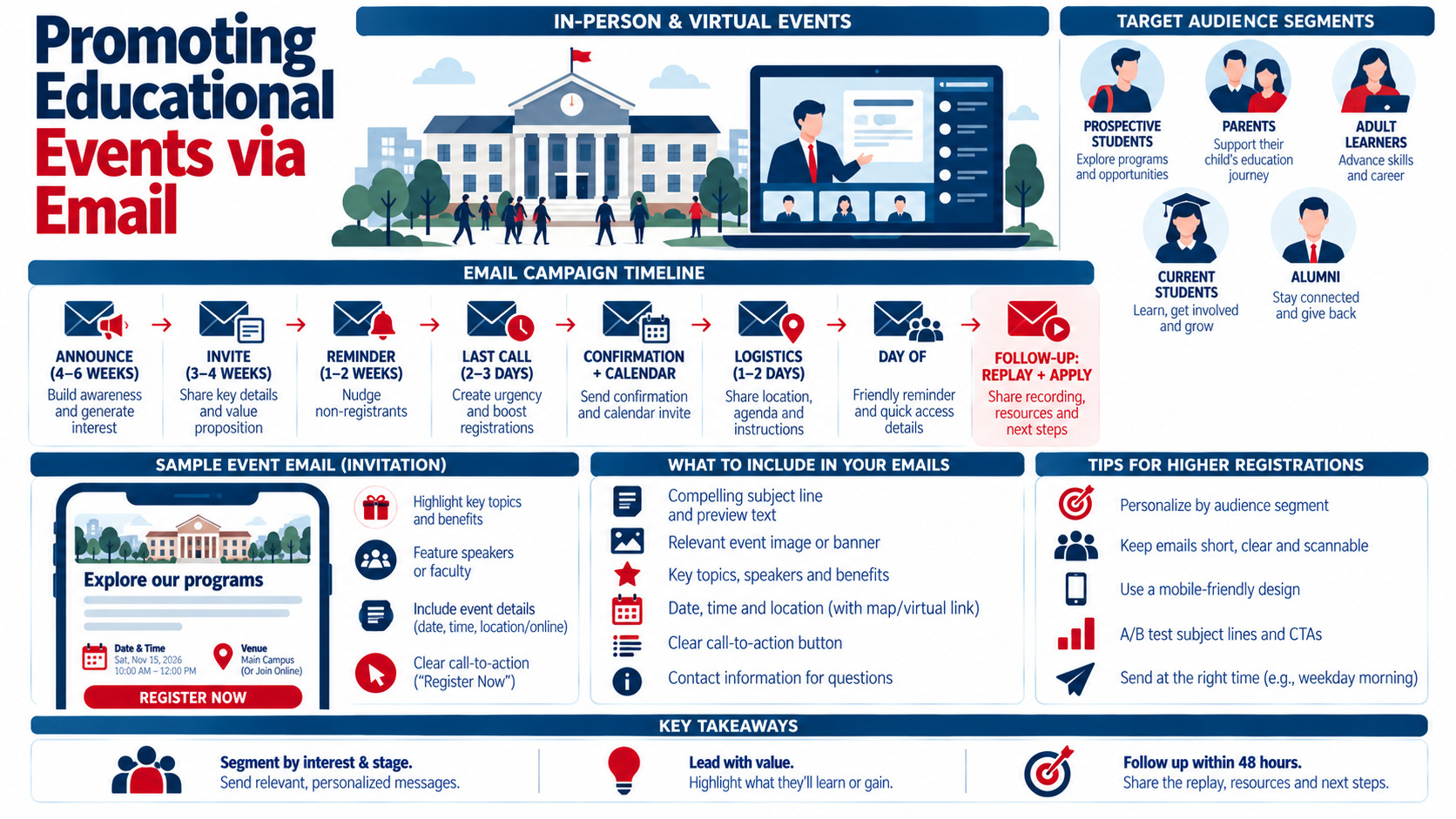
Step 1: Segment Your Audience
- Prospective students: by program interest, location, grade level, or stage (inquiry, applicant, admitted)
- Parents and families: for K–12 and undergraduate decisions
- Adult learners: by career goals and industry
- Current students: by year, major, or campus
- Alumni: by graduation year, location, and interests — see engaging alumni with newsletters
- Corporate partners: for training programs
Segmentation lets you tailor subject lines, content, and session recommendations — see how to personalize your emails for maximum engagement.
Step 2: Lead With Value
Tell people what they'll gain:
- "Meet faculty and tour our new engineering labs"
- "Learn how to finance your degree in a 30-minute session"
- "Get hands-on with AI tools in a free 60-minute workshop"
- "Ask current students anything about campus life"
Step 3: Plan an Email Timeline
| Timing | Content | |
|---|---|---|
| 4–6 weeks before | Announcement / save the date | Event overview, date, value |
| 3–4 weeks before | Full invitation | Agenda, speakers, registration button |
| 2 weeks before | Reminder + highlights | Testimonials, photos from past events |
| 1 week before | "Spots filling" or last call | Urgency (if true), FAQs |
| After registration | Confirmation | Calendar invite, details, what to expect |
| 1–2 days before | Logistics | Parking, campus map, virtual link, schedule |
| Day of | Same-day reminder | Start time, link, contact info |
| 1–2 days after | Follow-up | Recording, resources, next steps (apply, enroll, schedule a call) |
Exclude registrants from promotional reminders and send them logistics instead. Nonprofit event timelines are similar — see promoting events via email: a nonprofit's guide.
Step 4: Write Compelling Subject Lines
- "You're invited: Fall Open House on Saturday, Nov. 7"
- "Explore our nursing program in 30 minutes (virtual session)"
- "Tomorrow: Your campus tour details inside"
- "Free workshop: Build your first data dashboard"
- "Missed the info session? Watch the replay"
More ideas are in 10 subject line hacks to boost your open rates.
Step 5: Design Clear, Mobile-Friendly Emails
- Headline with the event name and benefit
- Date, time (with time zone), and location or virtual platform
- Short agenda or highlights
- Speaker or faculty photos
- One prominent "Register" button — see writing compelling CTAs for email campaigns
- Accessibility: alt text, readable fonts, and sufficient contrast
Visual design tips are in how to use visuals to enhance your emails.
Step 6: Make Registration Effortless
- Short forms (name, email, program interest)
- Mobile-friendly registration pages
- Instant confirmation emails with calendar links
- Options to bring guests (for families)
- Clear accessibility accommodations request option
Step 7: Increase Attendance
- Reminders one week, one day, and one hour before (for virtual events)
- SMS reminders for those who opt in
- Personalized notes from admissions counselors or faculty
- Clear parking, check-in, and virtual access instructions
Virtual event best practices are covered in hosting virtual events to engage your audience.
Step 8: Follow Up to Drive Enrollment
- Attendees: thank-you email with resources, next steps, application links, and counselor contact
- No-shows: replay or rescheduling options
- High-engagement attendees: personal outreach from admissions
- Nurture sequence: student stories, financial aid information, deadline reminders
Lead nurturing ideas are in lead nurturing emails best practices for B2B — the same principles apply to enrollment funnels.
Example: A University Open House Campaign
- Six weeks out: save-the-date to prospective students and parents segmented by program interest
- Four weeks out: invitation featuring program-specific sessions and student panels
- Two weeks out: reminder with photos and testimonials from last year's event
- Registrants: confirmation, calendar invite, and campus map
- Two days before: parking and schedule details
- After: thank-you with application fee waiver code (if offered), counselor contact, and upcoming deadlines
- No-shows: virtual tour link and next open house date
Measuring Success
- Registration rate by segment
- Attendance rate (attendees ÷ registrants)
- Post-event inquiries, applications, or enrollments
- Email engagement (clicks, conversions)
- Event feedback survey results
Analytics guidance is in using analytics tools to measure email performance.
Common Mistakes
- Generic invitations without segment-specific value
- Missing time zones for virtual events
- Long registration forms
- No logistics or calendar invites for registrants
- Weak or slow post-event follow-up
- Ignoring no-shows
Personalizing Invitations by Program and Stage
The same open house can be promoted differently to each audience:
- Inquiry-stage prospects: highlight campus life, programs, and a no-pressure tour
- Applicants: emphasize meeting faculty, financial aid sessions, and application tips
- Admitted students: focus on housing, orientation, and connecting with future classmates
- Parents: cover safety, outcomes, costs, and support services
- Adult learners: stress flexible schedules, career outcomes, and online options
Dynamic content blocks let one campaign show different sections for each segment — see the power of dynamic content in emails.
Key Takeaways
- Email fills educational events and moves prospects toward enrollment.
- Segment by prospective students, parents, adult learners, current students, and alumni.
- Lead with the value of attending and follow a planned sequence of emails.
- Make registration effortless and send logistics and reminders to registrants.
- Follow up quickly with recordings, next steps, and personalized outreach.
Frequently Asked Questions
How far in advance should I promote an educational event?
Start promoting about four to six weeks before major events like open houses, with a full invitation three to four weeks out and reminders closer to the date. Smaller webinars and workshops may need two to three weeks.
How many emails should I send to promote an educational event?
Many institutions send three to five promotional emails, plus confirmation, logistics, day-of, and follow-up emails for registrants. Exclude registrants from promotional reminders to avoid repetition.
How do I increase attendance at school events?
Send calendar invites, reminders one week and one day before, SMS reminders with consent, clear logistics, and personalized messages from counselors or faculty. Make the value of attending clear in every message.
What should a follow-up email after an educational event include?
Thank attendees, share recordings or resources, highlight next steps such as applying or scheduling a call, provide counselor contact details, and include upcoming deadlines. Send no-shows a replay or alternative dates.
How do I measure the success of educational event emails?
Track registrations by segment, attendance rates, clicks and conversions from emails, post-event inquiries, applications, enrollments, and attendee feedback. Compare results across events to improve future campaigns.
Want educational events that fill seats and drive enrollments? AiScope Digital's email marketing services help schools and training providers plan, automate, and optimize event campaigns — get a free consultation today.