
To measure email performance accurately, combine three types of analytics: your email platform's reports (deliveries, clicks, unsubscribes, complaints, revenue), website analytics like Google Analytics 4 using UTM-tagged links (sessions, conversions, revenue by campaign), and deliverability tools (Google Postmaster Tools, inbox placement tests, authentication monitoring). Focus on metrics tied to outcomes — click-through rate, conversion rate, revenue per recipient, list growth, and complaint rate — rather than opens alone, since privacy features like Apple Mail Privacy Protection inflate open rates. Then build a simple dashboard, compare against your own baselines, and run A/B tests to improve. Here's a complete guide to email analytics in 2026.
The Email Metrics That Matter
| Metric | Formula / Meaning | Why It Matters |
|---|---|---|
| Delivery rate | Delivered ÷ sent | Shows list quality and technical health |
| Bounce rate | Bounced ÷ sent (hard and soft) | High hard bounces damage sender reputation |
| Open rate | Opens ÷ delivered | Directional only, due to privacy-related auto-opens |
| Click-through rate (CTR) | Unique clicks ÷ delivered | Core engagement metric |
| Click-to-open rate (CTOR) | Unique clicks ÷ unique opens | Content relevance (interpret carefully with MPP) |
| Conversion rate | Conversions ÷ clicks (or ÷ delivered) | Business impact |
| Revenue per recipient (RPR) | Revenue ÷ delivered | Compares campaigns of any size |
| Unsubscribe rate | Unsubscribes ÷ delivered | Relevance and frequency health |
| Spam complaint rate | Complaints ÷ delivered | Critical for deliverability; keep very low |
| List growth rate | (New subscribers − losses) ÷ list size | Long-term channel health |
ROI calculations are covered in email marketing tactics to skyrocket your ROI.
Why Open Rates Are Less Reliable Now
Apple Mail Privacy Protection (MPP) preloads email content, including tracking pixels, which can register opens even when people don't read the email. Some other clients and security scanners also trigger opens or clicks automatically. As a result:
- Open rates are often inflated and less precise
- Send-time optimization and "engaged" segments based only on opens may be skewed
- Subject line tests based on opens are less reliable
What to do: prioritize clicks, conversions, and revenue; segment engagement using clicks and site activity; filter suspected bot clicks where your platform supports it; and use opens only as a directional signal.
Tool 1: Your Email Platform's Analytics
Most email service providers report:
- Campaign and automation performance
- Clicks by link and heatmaps
- Device and email client breakdowns
- Unsubscribes and complaints
- E-commerce revenue (with store integrations)
- A/B test results
- Subscriber engagement scores
Platform options are compared in top CRM tools for email marketing.
Tool 2: Google Analytics 4 With UTM Tracking
Add UTM parameters to every link so GA4 can attribute sessions and conversions:
https://example.com/spring-sale?utm_source=newsletter&utm_medium=email&utm_campaign=spring_sale_2026&utm_content=hero_button
| Parameter | Example | Purpose |
|---|---|---|
| utm_source | newsletter, welcome_series | Identifies the list or program |
| utm_medium | Groups all email traffic | |
| utm_campaign | spring_sale_2026 | Identifies the campaign |
| utm_content | hero_button, footer_link | Distinguishes links within an email |
Many email platforms add UTMs automatically. In GA4, review Traffic acquisition and Key events by session source/medium and campaign. GA4 setup tips are in how to use Google Analytics for SEO, which covers key events and reports that apply to email too.
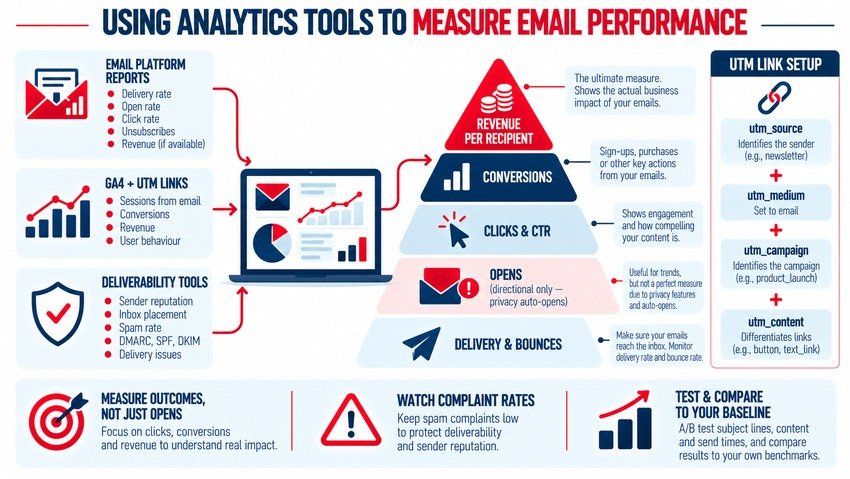
Tool 3: Deliverability Monitoring
Even great emails fail if they don't reach the inbox:
- Google Postmaster Tools: domain reputation, spam rate, and authentication results for Gmail
- Microsoft SNDS: sending data for Outlook and Microsoft consumer mailboxes
- Inbox placement and seed testing tools: estimate inbox vs. spam placement
- DMARC reporting tools: monitor SPF, DKIM, and DMARC alignment
- Blocklist monitors: alert you if your sending IP or domain is listed
Major mailbox providers require bulk senders to authenticate email, offer easy one-click unsubscribe, and keep spam complaint rates low. Best practices are in top tips for improving email deliverability.
Tool 4: CRM and Revenue Attribution
For B2B and longer sales cycles, connect email engagement to your CRM to track:
- Leads and opportunities influenced by email
- Pipeline value and closed revenue by campaign
- Time from first email to deal
- Engagement scores for sales follow-up
Learn how CRM supports retention in use CRM tools to improve customer retention.
Building an Email Performance Dashboard
Include:
- Campaign summary: sends, delivery rate, CTR, conversion rate, revenue, RPR
- Automation performance: welcome, abandoned cart, post-purchase, winback
- List health: growth, unsubscribes, complaints, inactive subscribers
- Deliverability: bounce rate, spam rate, domain reputation
- Trends: month-over-month and year-over-year comparisons
Looker Studio, your ESP's dashboards, or BI tools can combine email and GA4 data. Reporting support is covered in data analytics marketing powers campaigns.
Benchmarks: Compare Against Yourself First
Industry benchmarks vary widely by industry, list type, and how platforms measure metrics. Use them as rough context, but focus on your own baselines: compare similar campaigns over time and set improvement goals for CTR, conversion rate, and RPR.
Improving Performance With Testing
A/B test one variable at a time — subject lines, preheaders, send times, CTAs, layout, offers, or segments — and measure based on clicks or conversions rather than opens. Methods are in A/B testing: what it is and how to do it right. Use predictive insights to go further — see predictive analytics in email campaigns.
Monthly Email Analytics Checklist
- Review top and bottom campaigns by RPR and conversion rate
- Check automation flow performance and fix weak steps
- Monitor complaint, bounce, and unsubscribe rates
- Review Postmaster Tools and DMARC reports
- Analyze link clicks to learn which content resonates
- Compare segments and devices
- Plan next month's tests based on findings
Common Mistakes
- Judging success by open rates alone
- Not using UTM parameters
- Ignoring deliverability metrics until problems appear
- Comparing campaigns of different types without context
- Measuring clicks without tracking conversions and revenue
Example: Diagnosing a Drop in Email Revenue
Suppose monthly email revenue falls even though send volume stayed the same. A structured analysis might look like this:
- Check deliverability first: Postmaster Tools shows the spam rate rose and domain reputation dropped
- Review list sources: a new sign-up form without confirmation added low-quality addresses
- Look at clicks by segment: engaged subscribers still click, but new subscribers barely engage
- Compare automations: the welcome series conversion rate fell after a template change
- Act: add double opt-in to the new form, suppress unengaged new contacts, restore the old welcome template, and monitor complaint rates weekly
Without combining email, website, and deliverability data, the team might have blamed subject lines or offers instead of the real cause.
Key Takeaways
- Combine email platform reports, GA4 with UTMs, and deliverability tools.
- Prioritize clicks, conversions, revenue per recipient, and complaint rates.
- Treat open rates as directional due to privacy-related auto-opens.
- Build a dashboard covering campaigns, automations, list health, and deliverability.
- Benchmark against your own baselines and improve through A/B testing.
Frequently Asked Questions
What are the most important email marketing metrics?
Key metrics include delivery rate, bounce rate, click-through rate, conversion rate, revenue per recipient, unsubscribe rate, spam complaint rate, and list growth. Open rate can be useful directionally, but privacy features make it less reliable.
Why are my email open rates so high?
Privacy features like Apple Mail Privacy Protection and automated security scanners can preload images and tracking pixels, registering opens even when recipients don't read the email. This inflates open rates, so focus on clicks and conversions.
How do I track email conversions in Google Analytics 4?
Add UTM parameters to every email link, with utm_medium set to email and consistent source and campaign names. Set up key events in GA4 for actions like purchases or form submissions, then review conversions by session source, medium, and campaign.
What tools help monitor email deliverability?
Google Postmaster Tools, Microsoft SNDS, inbox placement or seed testing tools, DMARC reporting services, and blocklist monitors help track domain reputation, spam rates, authentication, and inbox placement.
What is revenue per recipient in email marketing?
Revenue per recipient (RPR) is the total revenue generated by an email divided by the number of delivered emails. It allows fair comparisons between campaigns of different sizes and directly connects email performance to business results.
Want clear email reporting that ties campaigns to revenue? AiScope Digital's email marketing services and analytics and reporting services set up tracking, dashboards, and testing programs — get a free consultation today.