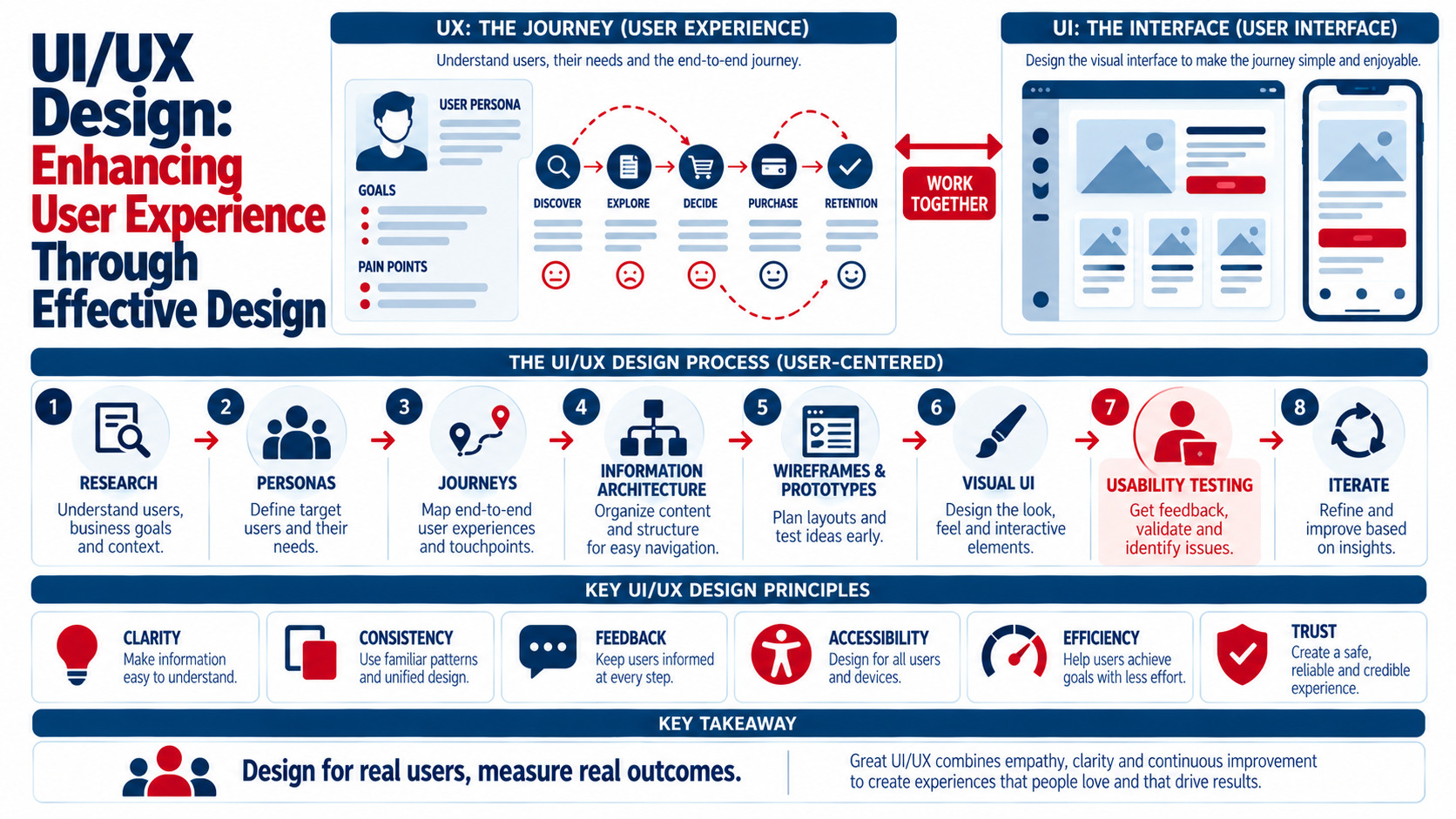
UI/UX design shapes how people feel and succeed when they use a website or app. UX (user experience) design focuses on the whole journey — understanding users, structuring information, and making tasks easy — while UI (user interface) design focuses on the visual and interactive layer — layouts, typography, colors, buttons, and components. Effective UI/UX design follows a user-centered process: research users and goals, map user journeys, organize information architecture, create wireframes and prototypes, design a consistent visual interface, build in accessibility, test with real users, and iterate based on data. Good UI/UX reduces friction, builds trust, increases conversions, and lowers support costs. Here's how to apply it.
UI vs. UX: What's the Difference?
| Aspect | UX Design | UI Design |
|---|---|---|
| Focus | How the experience works and feels overall | How the interface looks and behaves |
| Key questions | Can users accomplish their goals easily? | Is the interface clear, consistent, and attractive? |
| Activities | Research, personas, journeys, information architecture, wireframes, usability testing | Visual design, typography, color, components, interactions, design systems |
| Deliverables | User flows, sitemaps, wireframes, prototypes, research insights | Mockups, style guides, UI kits, design systems |
| Success measures | Task completion, ease of use, satisfaction, conversions | Clarity, consistency, accessibility, visual appeal |
UI and UX work together: a beautiful interface fails if the flow is confusing, and a logical flow underperforms if the interface is hard to read. Fundamentals are introduced in UX/UI basics for beginners to modern web design.
The UI/UX Design Process
1. Research Users and Business Goals
- Stakeholder interviews to define business objectives
- User interviews and surveys to understand needs and pain points
- Analytics and heatmaps to find friction — see website heatmaps optimization for designs
- Competitor and usability audits
2. Define Personas and Jobs to Be Done
Create personas that describe user goals, contexts, and frustrations, or frame needs as "jobs to be done" ("When I need a quote, I want to understand pricing quickly so I can compare options").
3. Map User Journeys and Flows
Map steps users take to complete key tasks — booking an appointment, buying a product, requesting a quote — and identify friction points.
4. Design Information Architecture
Organize content and navigation so users can find what they need. Card sorting and tree testing validate menu structures — see website architecture best guide.
5. Wireframe and Prototype
Start with low-fidelity sketches and wireframes to focus on structure, then build interactive prototypes for testing — see sketching and conceptualizing: bringing ideas to paper.
6. Create the Visual Interface
Apply brand typography, colors, spacing, iconography, and components through a design system. Layout principles are covered in creating effective layouts: grid systems and beyond.
7. Test With Real Users
Run usability tests (moderated or unmoderated), A/B tests, and accessibility audits. Observe where people hesitate or fail.
8. Iterate and Improve
Use feedback and analytics to refine designs continuously after launch.
Core UI/UX Principles
| Principle | What It Means | Example |
|---|---|---|
| Clarity | Users instantly understand what they see and can do | Clear headings, plain language, obvious CTAs |
| Consistency | Similar elements look and behave the same | Uniform buttons, icons, and navigation |
| Visual hierarchy | Important elements stand out | Larger headlines, contrasting CTA colors |
| Feedback | The interface responds to actions | Loading states, success messages, form validation |
| Simplicity | Remove unnecessary steps and clutter | Short forms, focused pages |
| Accessibility | Usable by people of all abilities | Contrast, keyboard navigation, alt text, captions |
| Error prevention and recovery | Help users avoid and fix mistakes | Input formats, undo options, helpful error messages |
| Familiarity | Use recognizable patterns | Standard icons and navigation placement |
| Speed | Fast loading and responsive interactions | Optimized images and code |
Designing for Accessibility
Accessible design improves usability for everyone:
- Meet WCAG contrast requirements (4.5:1 for normal text)
- Support keyboard navigation and visible focus states
- Use semantic HTML and proper headings
- Provide alt text and captions
- Label form fields clearly
- Avoid relying on color alone
- Respect reduced-motion preferences
Color guidance is in color theory: how to choose the right palette for your website.
Mobile-First UX
Design for small screens first: thumb-friendly navigation, large tap targets, concise content, fast loading, and simplified forms — see responsive design techniques for mobile-friendly websites and how to optimize your site for mobile page speed.
Measuring UI/UX Success
- Task success rate: can users complete key tasks?
- Time on task: how long tasks take
- Error rate: mistakes during tasks
- Conversion rate: sign-ups, purchases, bookings
- System Usability Scale (SUS) and satisfaction surveys
- Net Promoter Score
- Engagement metrics in analytics
- Support tickets related to usability issues
Testing methods are covered in A/B testing: what it is and how to do it right.
Example: Improving a Booking Flow
A salon's online booking has a high drop-off rate. UX research finds users don't see available times until step four. The redesign:
- Shows available times on the first screen
- Reduces form fields from nine to four
- Adds a progress indicator
- Offers guest booking without account creation
- Sends instant confirmation by email and SMS
Usability testing confirms faster completion, and analytics show more completed bookings after launch.
Tools for UI/UX Design
- Design and prototyping: Figma, Sketch, Adobe XD, Framer
- Research and testing: usability testing platforms, survey tools, heatmaps and session recordings
- Collaboration: design systems, component libraries, developer handoff tools
- Accessibility: contrast checkers, screen readers, automated audit tools
App-specific guidance is in crafting user-friendly app designs: best practices and tips.
Common UI/UX Mistakes
- Designing based on opinions instead of user research
- Cluttered interfaces with competing CTAs
- Inconsistent components and styles
- Ignoring accessibility and mobile users
- Long, complex forms
- Skipping usability testing
UX Writing: The Words Matter Too
Microcopy — button labels, form hints, error messages, and empty states — has a big effect on usability:
- Use specific button labels ("Book my appointment" instead of "Submit")
- Explain why you need information ("We'll text you a reminder")
- Write error messages that say what went wrong and how to fix it
- Keep instructions short and in plain language
- Match your brand voice consistently across the interface
Key Takeaways
- UX focuses on the overall journey; UI focuses on the interface people interact with.
- Follow a user-centered process: research, journeys, architecture, wireframes, UI, testing, iteration.
- Apply principles of clarity, consistency, hierarchy, feedback, simplicity, and accessibility.
- Design mobile-first and measure success with task completion, conversions, and satisfaction.
- Test with real users and improve continuously.
Frequently Asked Questions
What is the difference between UI and UX design?
UX design focuses on the overall experience — understanding users, structuring content, and making tasks easy to complete. UI design focuses on the visual and interactive elements users see, such as layouts, typography, colors, buttons, and components.
Why is UI/UX design important for websites?
Good UI/UX design makes websites easier to use, builds trust, reduces frustration, and helps visitors complete tasks like purchasing, booking, or contacting you. This improves conversions, customer satisfaction, and supports SEO through better engagement.
What are the main steps in the UX design process?
Common steps include user research, defining personas or user needs, mapping user journeys, designing information architecture, creating wireframes and prototypes, designing the visual interface, usability testing, and iterating based on feedback and data.
How do you measure user experience?
Measure task success rate, time on task, error rate, conversion rates, satisfaction surveys such as the System Usability Scale, Net Promoter Score, analytics engagement metrics, and usability-related support requests.
What tools do UI/UX designers use?
Designers often use Figma, Sketch, Adobe XD, or Framer for design and prototyping, along with usability testing platforms, survey tools, heatmaps, session recordings, accessibility checkers, and design system libraries.
Want a website or app that users love? AiScope Digital's website development and design services and designing services deliver research-driven UI/UX that converts — get a free UX review today.