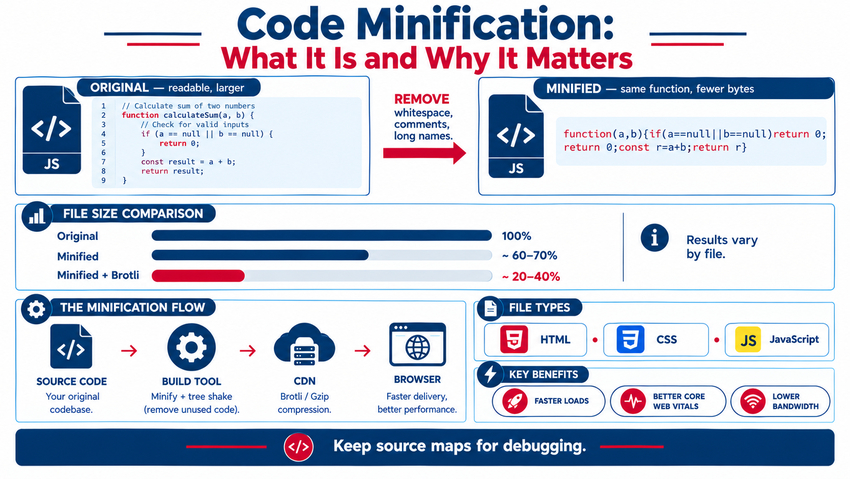
Code minification is the process of removing everything a browser doesn't need from HTML, CSS, and JavaScript files — whitespace, line breaks, comments, and long variable names — without changing how the code works. Minified files are smaller, so they download and parse faster, which improves page speed, Core Web Vitals, mobile performance, and bandwidth costs. Minification is typically automated with build tools (like esbuild, Terser, or cssnano), CDNs, or WordPress optimization plugins, and it works best combined with compression (Gzip or Brotli), caching, and removing unused code. Here's how minification works, what it saves, and how to implement it safely.
Minification Example
Before (readable CSS):
/* Primary button styles */
.button-primary {
    background-color: #033661;
    color: #ffffff;
    padding: 12px 24px;
    border-radius: 8px;
}
After (minified):
.button-primary{background-color:#033661;color:#fff;padding:12px 24px;border-radius:8px}
Same result in the browser — fewer bytes to download.
What Minification Removes or Shortens
| Element | Example | Minified Result |
|---|---|---|
| Whitespace and line breaks | Indentation, blank lines | Removed |
| Comments | /* header styles */, // helper function |
Removed (license comments may be kept) |
| Long variable names (JS) | calculateTotalPrice |
Shortened to a, b, etc. (mangling) |
| Redundant code | Unused semicolons, duplicate rules | Removed or merged |
| Color and value shorthand | #ffffff, 0px |
#fff, 0 |
| Unnecessary quotes and attributes (HTML) | Optional quotes, default attributes | Removed where safe |
Minification vs. Compression vs. Bundling vs. Obfuscation
| Technique | What It Does | Works With Minification? |
|---|---|---|
| Minification | Removes unnecessary characters from code files | — |
| Compression (Gzip, Brotli) | Server compresses files for transfer; browser decompresses | Yes — use both for maximum savings |
| Bundling | Combines multiple files to reduce requests | Yes, though HTTP/2 makes heavy bundling less critical |
| Tree shaking / unused code removal | Eliminates code that's never used | Yes — often bigger savings than minification |
| Obfuscation | Makes code intentionally hard to read | Different goal; not a security measure |
Why Minification Matters
1. Faster Page Loads
Smaller files download faster, especially on mobile networks. JavaScript and CSS are often render-blocking, so trimming them helps content appear sooner.
2. Better Core Web Vitals
Reduced file sizes and faster parsing can improve Largest Contentful Paint (LCP) and help Interaction to Next Paint (INP) by reducing JavaScript processing time.
3. SEO Benefits
Page speed is part of page experience, and faster sites tend to see better engagement. Lighthouse and PageSpeed Insights flag "Minify CSS" and "Minify JavaScript" as opportunities — see how to speed up your website.
4. Lower Bandwidth Costs
Smaller files reduce data transfer for both your hosting and your visitors.
5. Better Mobile Experience
Mobile devices have slower processors and networks, so every kilobyte matters — see how to optimize your site for mobile page speed.
How to Minify Your Code
Modern Build Tools
If your site uses a JavaScript build process, minification usually happens in production builds:
- Vite, Next.js, Nuxt, Astro, and similar frameworks: minify automatically in production
- esbuild and SWC: extremely fast JavaScript and CSS minification
- Terser: widely used JavaScript minifier
- cssnano and Lightning CSS: CSS minification and optimization
- html-minifier-terser: HTML minification
WordPress Sites
Performance and caching plugins can minify and combine CSS, JavaScript, and HTML. Enable features gradually and test after each change, since aggressive combining or deferring can break themes and plugins. Plugin options are covered in top plugins to enhance your WordPress site.
CDNs and Hosting
Some CDNs and hosts offer automatic minification or optimization at the edge, plus Brotli compression and caching.
Online Tools
For one-off files, online minifiers work, but automated build processes are more reliable for ongoing development.
Best Practices
- Keep original source files for editing — never edit minified files directly
- Generate source maps so developers can debug minified code in production
- Minify only in production builds; keep development builds readable
- Combine with compression (Brotli preferred, Gzip as fallback)
- Remove unused CSS and JavaScript with tree shaking and coverage tools
- Defer or async non-critical scripts and inline critical CSS
- Set long cache lifetimes with versioned filenames (e.g.,
app.3f9a1c.js) - Test thoroughly after enabling minification, especially on WordPress
Common Minification Pitfalls
| Issue | Cause | Fix |
|---|---|---|
| JavaScript errors after minifying | Missing semicolons, conflicts when combining files | Exclude problem scripts, use modern minifiers |
| Broken layouts | CSS order changed during combining | Disable combining or adjust load order |
| Hard-to-debug production errors | No source maps | Enable source maps for developers |
| Little speed improvement | Large unused libraries remain | Remove unused code; reduce third-party scripts |
| Cache serving old files | Filenames not versioned | Use cache-busting hashes |
Measuring the Impact
- Run Lighthouse or PageSpeed Insights before and after
- Compare file sizes in browser DevTools (Network tab, with and without compression)
- Monitor Core Web Vitals in Search Console
- Track page load and conversion metrics in analytics
Broader speed strategies are in website loading speed optimization, and technical audits in 10 technical SEO tips to boost your site's performance.
Minification in the Bigger Performance Picture
Minification is a quick win, but often not the biggest one. Large images, heavy third-party scripts, unused JavaScript libraries, and slow servers typically cost more. Combine minification with image optimization — see image optimization best practices for faster load times — and a lean front-end architecture for the best results.
Example: Auditing a Slow Page for Minification Opportunities
- Run PageSpeed Insights and note the "Minify CSS," "Minify JavaScript," and "Reduce unused JavaScript" opportunities
- Open DevTools and sort Network requests by size to find the largest CSS and JS files
- Use the Coverage tab to see how much of each file is unused on the page
- Enable minification in your build tool or plugin, then retest
- Remove or lazy-load unused libraries, such as sliders or animation scripts loaded on every page
- Confirm Brotli or Gzip compression is active in response headers (
content-encoding) - Re-run PageSpeed Insights and compare scores and file sizes
Key Takeaways
- Minification removes unnecessary characters from HTML, CSS, and JavaScript without changing functionality.
- Smaller files load and parse faster, improving speed, Core Web Vitals, and mobile UX.
- Use build tools, WordPress plugins, or CDNs to automate minification.
- Combine minification with Brotli/Gzip compression, caching, and unused-code removal.
- Keep source files and source maps, and test carefully after enabling.
Frequently Asked Questions
What is code minification?
Code minification is the process of removing unnecessary characters from HTML, CSS, and JavaScript, such as whitespace, comments, and line breaks, and shortening variable names, without changing how the code works. It reduces file sizes so pages load faster.
Does minification improve SEO?
Minification can improve page speed and Core Web Vitals, which are part of Google's page experience signals and influence user engagement. It's a supporting technical optimization rather than a major ranking factor on its own.
What is the difference between minification and compression?
Minification permanently removes unnecessary characters from code files, while compression such as Gzip or Brotli temporarily encodes files for transfer and the browser decompresses them. Using both together delivers the smallest file sizes.
Can minification break my website?
Minification itself rarely breaks code when using modern tools, but combining files or aggressive optimization in plugins can cause JavaScript errors or layout issues. Enable features gradually, test thoroughly, and exclude problematic files if needed.
How do I minify CSS and JavaScript in WordPress?
Use a reputable performance or caching plugin that offers CSS, JavaScript, and HTML minification. Enable minification first, test the site, then consider combining or deferring files, and keep backups so you can roll back changes.
Want a faster site without breaking anything? AiScope Digital's website development and design services optimize code, images, and hosting to improve Core Web Vitals — get a free speed audit today.