An animated logo brings your brand mark to life through movement — a reveal, morph, bounce, draw-on line, or subtle loop — for use in videos, websites, apps, social media, presentations, and digital ads. Done well, motion makes your brand more memorable, expresses personality (precise, playful, bold, elegant), and creates a polished, modern impression. The keys are: start from a strong static logo, define motion principles that match your brand, keep animations short (often one to three seconds for intros, a few seconds for loops), design multiple versions for different uses, export in the right formats (MP4/WebM for video, Lottie or SVG for web and apps, GIF only when necessary), and respect performance and accessibility, including reduced-motion preferences. Here's how to add motion to your brand identity.
Why Animated Logos Matter
- Memorability: motion captures attention and improves recall
- Personality: how a logo moves communicates brand character
- Professionalism: polished intros and outros elevate videos and presentations
- Digital-first branding: motion fits screens, social feeds, and apps
- Storytelling: animations can reveal meaning hidden in the mark
Visual identity foundations are covered in the power of visual identity.
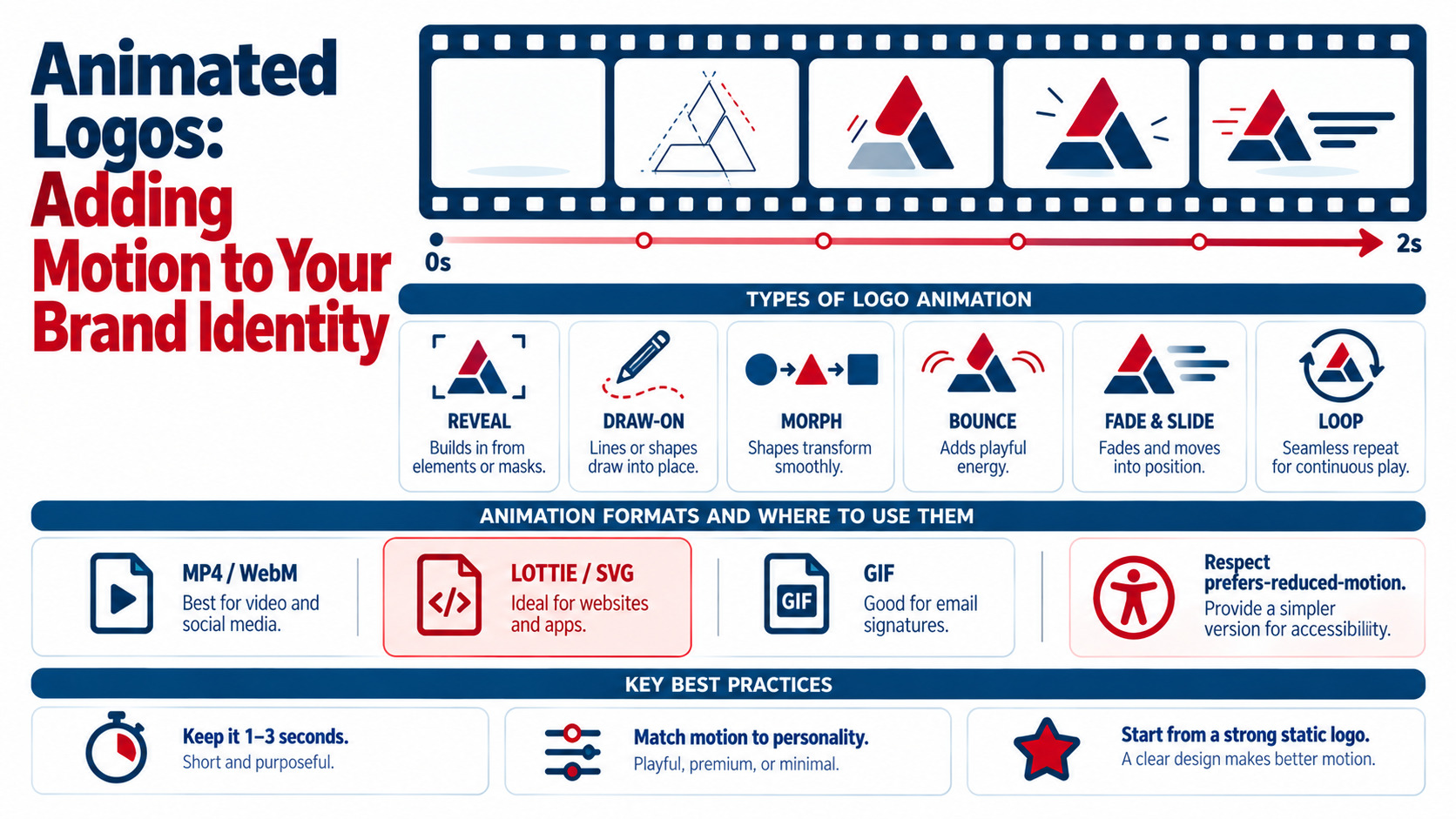
Types of Logo Animations
| Animation Type | Description | Brand Feel |
|---|---|---|
| Reveal / build | Elements appear in sequence to form the logo | Confident, structured |
| Draw-on / line animation | Strokes appear as if being drawn | Creative, crafted, elegant |
| Morph / transformation | One shape transforms into the logo | Innovative, dynamic |
| Bounce / elastic | Playful motion with squash and stretch | Friendly, fun |
| Fade and slide | Subtle movement with opacity changes | Professional, minimal |
| Glitch / digital | Distortion effects | Tech, gaming, edgy |
| 3D rotation or extrusion | Depth and dimension | Premium, bold |
| Looping idle animation | Gentle, continuous motion | Ambient presence in apps and websites |
| Loading animation | Logo used as a loader | Practical branding during waits |
Where to Use Animated Logos
- Video intros and outros for YouTube, ads, and presentations
- Social media: profile videos, Reels and Stories openers, post endings
- Websites: hero sections, loaders, and micro-interactions
- Apps: splash screens and onboarding
- Digital ads and display banners — see creating banner ads that drive clicks and conversions
- Events and screens: trade show displays, conference stages — see trade show displays: designing booths that attract visitors
- Email signatures and newsletters (lightweight GIF versions)
Step 1: Start With a Strong Static Logo
Animation should enhance a well-designed logo, not compensate for a weak one. Make sure your static logo works in one color, at small sizes, and across applications — see complete overhauls: when and how to redesign your logo if it needs updating first.
Step 2: Define Motion Principles
Choose motion characteristics that reflect your brand personality:
| Brand Personality | Motion Style |
|---|---|
| Luxury / elegant | Slow, smooth easing; minimal movement; fades and draws |
| Tech / innovative | Precise, snappy timing; geometric transitions; morphs |
| Playful / friendly | Bouncy easing; squash and stretch; color pops |
| Corporate / trustworthy | Steady, balanced reveals; restrained motion |
| Bold / energetic | Fast cuts, dynamic scaling, strong rhythm |
Document timing, easing curves, direction, and sound (if used) so all motion assets stay consistent. Animation fundamentals are explored in the magic of animation: how to create captivating motion graphics.
Step 3: Storyboard and Animate
- Storyboard the sequence: how elements appear, move, and settle
- Prepare vector files with separated layers in Illustrator or your design tool — see Adobe Illustrator essential tips and tricks for logo design
- Animate in After Effects, Cinema 4D, Blender, Rive, or browser-based tools
- Refine timing and easing until movement feels natural
- Add sound (optional) for video intros — a short, branded audio signature
Step 4: Create Multiple Versions
| Version | Length | Use |
|---|---|---|
| Full intro | 2–5 seconds | Video openings, presentations, events |
| Short sting | 1–2 seconds | Social media, ads, transitions |
| Outro / end card | 3–5 seconds | Video endings with CTA |
| Loop | Seamless cycle | Websites, apps, digital signage |
| Loader | Seamless short loop | App and website loading states |
| Micro-interaction | Under 1 second | Hover effects, buttons, UI moments |
Step 5: Export the Right File Formats
- MP4 (H.264) or WebM: video platforms, social media, presentations
- MOV with alpha (ProRes 4444) or WebM with alpha: transparent overlays for video editors
- Lottie (JSON): lightweight, scalable animations for websites and apps
- Animated SVG / CSS: simple, lightweight web animations
- GIF: email signatures and platforms without video support (larger files, limited colors)
- Rive files: interactive, state-based animations for apps and web
Step 6: Optimize for Performance
- Keep web animations lightweight (Lottie or SVG over heavy video where possible)
- Lazy-load animations below the fold
- Avoid blocking page content while animations play
- Compress video exports appropriately
- Test on mobile devices — see website loading speed optimization
Step 7: Respect Accessibility
- Honor the
prefers-reduced-motionsetting by showing a static logo or minimal fade - Avoid flashing or strobing effects
- Keep loops subtle and allow users to pause long-running animations
- Don't rely on animation alone to convey essential information
Example: Animating a Tech Startup's Logo
A cybersecurity startup's logo combines a shield icon with a geometric wordmark. Its animation plan:
- Full intro (3 seconds): the shield outline draws on, fills with navy, then the wordmark slides in with precise easing
- Social sting (1.5 seconds): the shield snaps into place with a subtle glow
- Web loader: the shield outline traces in a continuous loop
- Reduced-motion version: static logo with a simple fade
The motion feels precise and protective — matching the brand promise.
Common Mistakes
- Animations that are too long or complex
- Motion that doesn't match brand personality
- Heavy GIFs or videos slowing websites
- Only one version for every use case
- Ignoring reduced-motion and accessibility
- Animating a weak or outdated logo
Key Takeaways
- Animated logos add memorability, personality, and polish to digital branding.
- Start from a strong static logo and define motion principles that fit your brand.
- Keep animations short and create versions for intros, stings, loops, loaders, and UI.
- Export MP4/WebM for video, Lottie or SVG for web and apps, and GIF only when needed.
- Optimize performance and respect accessibility, including reduced-motion preferences.
Frequently Asked Questions
What is an animated logo?
An animated logo is a version of a brand's logo that moves, using effects like reveals, line drawing, morphing, bouncing, or looping. It's used in videos, websites, apps, social media, ads, and presentations to make the brand more memorable.
How long should a logo animation be?
Most logo animations are short — about one to three seconds for social stings and two to five seconds for video intros. Loops for websites and apps should be subtle and seamless.
What file format is best for animated logos?
Use MP4 or WebM for video and social media, Lottie JSON or animated SVG for websites and apps, MOV or WebM with alpha for transparent overlays, and GIF only where video isn't supported, such as some email signatures.
Does every brand need an animated logo?
Not every brand needs one, but brands active in video, social media, apps, or digital advertising benefit greatly. An animated logo adds polish and consistency to digital content and helps the brand feel modern.
How do I make animated logos accessible?
Respect users' prefers-reduced-motion settings by providing a static or minimal version, avoid flashing effects, keep loops subtle, allow pausing for longer animations, and ensure no essential information is conveyed only through motion.
Ready to bring your logo to life? AiScope Digital's logo and visual identity design services and designing services create animated logos and motion branding for every screen — get a free consultation today.