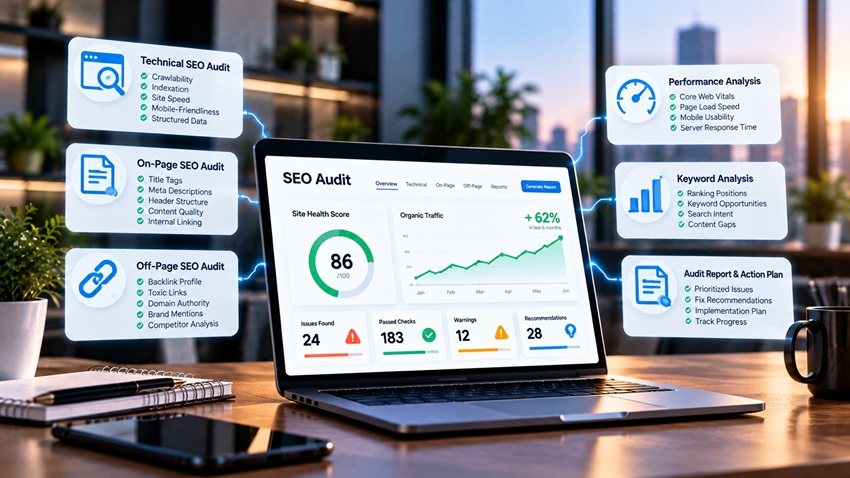
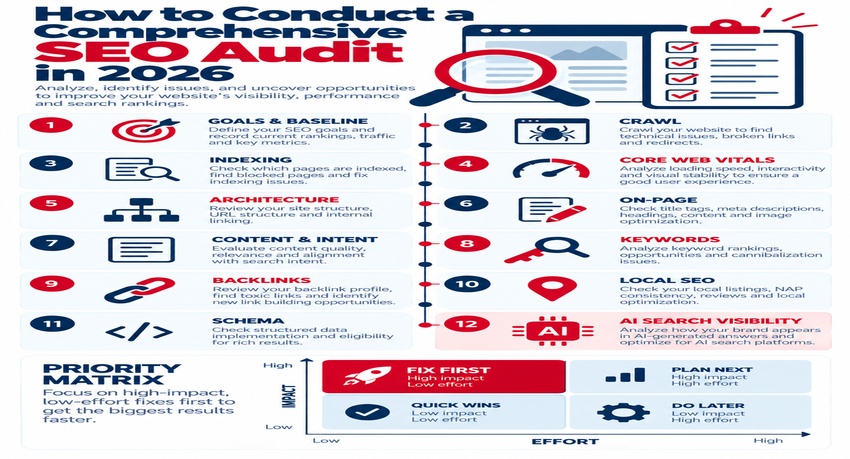
A comprehensive SEO audit is a structured review of everything that affects your website's search visibility — technical health, content quality, on-page optimization, backlinks, local presence, user experience, and, in 2026, how well your content appears in AI-powered search results. To conduct one: define goals and gather baseline data, crawl the site, check indexing in Search Console, review Core Web Vitals and mobile usability, audit site architecture and internal links, evaluate on-page elements, assess content quality and search intent alignment, analyze keyword rankings and gaps, review backlinks, check local SEO, verify structured data, evaluate AI search visibility, and turn findings into a prioritized action plan. This step-by-step guide shows what to check at each stage and which tools to use.
Why SEO Audits Matter
Websites change constantly — new pages, plugins, redesigns, and algorithm updates can introduce problems no one notices until traffic drops. Regular audits catch issues early, uncover growth opportunities, and keep SEO aligned with business goals — see why SEO audits are essential for your website's growth.
The SEO Audit Framework at a Glance
| Audit Area | What to Check | Key Tools |
|---|---|---|
| Goals and baseline | KPIs, traffic, conversions, rankings | GA4, Search Console |
| Crawl health | Status codes, redirects, broken links, duplicates | Screaming Frog, Sitebulb, Semrush, Ahrefs |
| Indexing | Indexed vs. excluded pages, sitemaps, robots.txt | Search Console, Bing Webmaster Tools |
| Performance | Core Web Vitals, mobile speed | PageSpeed Insights, CrUX data |
| Architecture | Click depth, internal links, orphan pages | Crawlers, site maps |
| On-page | Titles, descriptions, headings, images | Crawlers, manual review |
| Content | Quality, intent match, freshness, duplication | Analytics, manual review |
| Keywords | Rankings, gaps, cannibalization | Search Console, rank trackers |
| Backlinks | Quality, toxic links, competitor gaps | Ahrefs, Semrush, Moz |
| Local SEO | Google Business Profile, NAP, reviews | GBP, local rank tools |
| Structured data | Validity, coverage | Rich Results Test |
| AI search visibility | Mentions and citations in AI answers | Manual checks, AI visibility tools |
Step 1: Define Goals and Gather Baselines
Clarify what the audit should support — more leads, e-commerce revenue, local visibility, or recovery from a traffic drop. Record baseline organic sessions, conversions, top landing pages, and keyword positions for comparison.
Step 2: Crawl the Website
Run a full crawl to find:
- 4xx and 5xx errors
- Redirect chains and loops
- Duplicate titles, descriptions, and content
- Missing or multiple H1s
- Non-indexable pages linked internally
- Large images and slow resources
Step 3: Check Indexing and Crawlability
In Search Console's Page indexing report, review why pages are excluded (noindex, duplicate without canonical, crawled but not indexed). Confirm robots.txt isn't blocking important content and that XML sitemaps contain only canonical, indexable URLs. Technical fundamentals are explained in what is technical SEO and why does it matter.
Step 4: Review Core Web Vitals and Mobile Experience
Check Search Console's Core Web Vitals report for page groups failing LCP (≤2.5s), INP (≤200ms), or CLS (≤0.1). Test key templates on real mobile devices — see website loading speed optimization.
Step 5: Audit Site Architecture and Internal Linking
- Are important pages within three clicks of the homepage?
- Do pillar pages link to related cluster content and vice versa?
- Are there orphan pages with no internal links?
- Is anchor text descriptive?
See website architecture best guide.
Step 6: Evaluate On-Page Elements
Review title tags, meta descriptions, headings, URL structure, image alt text, and keyword placement on priority pages — see mastering on-page SEO: the complete guide.
Step 7: Assess Content Quality and Search Intent
For each important page, ask:
- Does it match the intent behind its target query? See mastering search intent optimization
- Is it accurate, current, and more helpful than competing pages?
- Does it show experience and expertise (authors, sources, examples)?
- Is there thin, outdated, or duplicate content to improve, merge, or remove?
Step 8: Analyze Keywords, Gaps, and Cannibalization
Use Search Console to find queries with high impressions but low clicks (title and snippet opportunities) and pages ranking in positions 8–20 (quick-win candidates). Identify keyword gaps versus competitors and pages competing for the same terms.
Step 9: Review Backlinks
Evaluate referring domains, link quality, anchor text distribution, lost links, and competitor link gaps — see the importance of backlinking strategies in 2026.
Step 10: Check Local SEO
For local businesses, audit Google Business Profile completeness, categories, reviews, photos, NAP consistency, and location pages — see the ultimate checklist for local SEO optimization in 2026.
Step 11: Validate Structured Data
Test key templates with the Rich Results Test and Schema Markup Validator. Confirm Organization, LocalBusiness, Article, Product, FAQ, and Breadcrumb markup are accurate — see maximize schema markup SEO for better rankings.
Step 12: Evaluate AI Search Visibility
Search your core topics in Google's AI features and popular AI assistants. Note whether your brand is mentioned or cited, which competitors appear, and what content gets referenced. Improve answer-first formatting, entity clarity, and authority signals where you're missing.
Turning Findings Into an Action Plan
| Priority | Criteria | Examples |
|---|---|---|
| Critical | Blocks indexing or causes major traffic loss | Accidental noindex, robots.txt blocks, broken redirects |
| High | Significant impact, moderate effort | Core Web Vitals failures, duplicate titles on key pages |
| Medium | Clear benefit, more effort | Content refreshes, internal link restructuring |
| Low | Minor or long-term gains | Alt text on old posts, minor schema enhancements |
Assign owners, deadlines, and success metrics for each item.
Example: Audit Findings for a B2B Services Site
An audit of a B2B services website found 40 pages blocked by an outdated robots.txt rule, three service pages competing for the same keyword, slow LCP on mobile due to an uncompressed hero video, and no Organization schema. The plan fixed robots.txt immediately, merged the overlapping pages with redirects, replaced the hero video with an optimized image, and added schema. Rankings for core services improved in the following months. Use your real figures to measure impact.
SEO Audit Checklist
- Goals, KPIs, and baselines documented
- Full crawl completed and errors exported
- Indexing issues reviewed in Search Console
- Core Web Vitals and mobile experience tested
- Architecture and internal links evaluated
- On-page elements reviewed on priority pages
- Content quality and intent alignment assessed
- Keyword gaps and cannibalization identified
- Backlink profile analyzed
- Local SEO checked
- Structured data validated
- AI search visibility reviewed
- Prioritized action plan created with owners and dates
Key Takeaways
- A comprehensive SEO audit reviews technical, content, links, local, and AI visibility.
- Start with goals and baselines, then crawl and check indexing.
- Evaluate performance, architecture, on-page, and content quality.
- Validate schema and check how AI search features cite your content.
- Prioritize fixes by impact and effort, and re-audit regularly.
Frequently Asked Questions
What is an SEO audit?
An SEO audit is a comprehensive review of a website's technical health, content, on-page optimization, backlinks, local presence, and user experience to identify issues that limit search visibility and opportunities for growth.
How often should I do an SEO audit?
Run a full audit at least once or twice a year, with lighter monthly monitoring in Search Console. Always audit before and after site migrations, redesigns, or major traffic changes.
What tools do I need for an SEO audit?
Core tools include Google Search Console, GA4, PageSpeed Insights, a site crawler like Screaming Frog or Sitebulb, a backlink tool like Ahrefs or Semrush, and schema validators.
How long does an SEO audit take?
A small website audit may take a few days, while large or complex sites can take several weeks. Timeline depends on site size, depth of analysis, and whether content and backlinks are reviewed in detail.
What should I fix first after an SEO audit?
Fix critical issues that block crawling or indexing first, then address high-impact items like Core Web Vitals failures, duplicate content on key pages, and quick-win keyword opportunities.
Want a thorough SEO audit with a clear action plan? AiScope Digital's search engine optimization services uncover what's holding your site back — request a free SEO audit today.