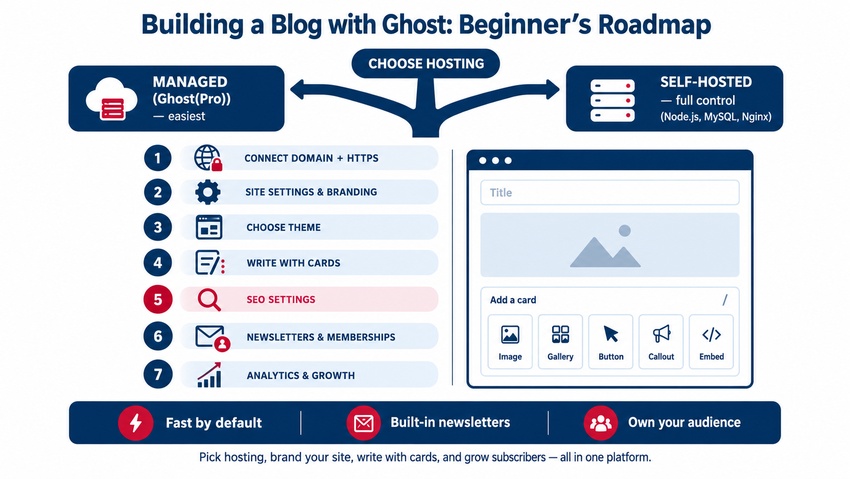
Ghost is an open-source publishing platform built for blogs, newsletters, and paid memberships. To build a Ghost blog: choose managed hosting with Ghost(Pro) or self-host on a server, set up your site title, logo, and branding, pick and customize a theme, write posts in Ghost's clean card-based editor, configure SEO settings (meta titles, descriptions, social cards, canonical URLs), enable newsletters and memberships if you want to grow an email audience or charge subscriptions, and connect analytics and a custom domain. Ghost is fast, focused, and SEO-friendly out of the box, which makes it a strong choice for writers, creators, and publications that care more about content than complex site features. Here's how to get started.
What Is Ghost?
Ghost launched in 2013 as a modern, writing-focused alternative to traditional blogging platforms. Key features include:
- A minimal, distraction-free editor with content "cards" (images, galleries, embeds, buttons, callouts)
- Built-in newsletters that send posts to subscribers by email
- Native memberships and paid subscriptions
- Built-in SEO features such as sitemaps, canonical tags, and structured data
- Fast performance with a Node.js backend
- Themes built with the Handlebars templating language
- A headless Content API for custom frontends
Ghost vs. WordPress vs. Other Platforms
| Factor | Ghost | WordPress | Hosted builders (Wix, Squarespace) |
|---|---|---|---|
| Primary focus | Publishing, newsletters, memberships | Websites of any kind | Small business websites |
| Ease of writing | Very clean and focused | Flexible but busier | Simple |
| Newsletters and paid memberships | Built in | Requires plugins | Varies, often add-ons |
| Plugins and extensions | Limited, uses integrations | Huge plugin ecosystem | App marketplaces |
| Performance | Fast by default | Depends on theme and plugins | Varies |
| Hosting | Ghost(Pro) or self-hosted | Self-hosted or managed | Hosted only |
| Best for | Writers, creators, publications | Businesses needing many features | Simple brochure sites |
If you're comparing broader CMS options, see choose the best CMS for your business website and WordPress vs. Joomla vs. Drupal.
Step 1: Choose Hosting
| Option | Pros | Cons |
|---|---|---|
| Ghost(Pro) managed hosting | Easiest setup, automatic updates, backups, email delivery, CDN | Monthly subscription cost |
| Self-hosted (VPS) | Full control, potentially lower cost at scale | Requires server management, updates, security, and email setup |
| One-click installs on cloud providers | Faster than manual self-hosting | Still requires maintenance |
Beginners usually find Ghost(Pro) easiest. Self-hosting typically involves a Linux server with Node.js, MySQL, Nginx, and the Ghost-CLI, plus an email service such as Mailgun for newsletters.
Step 2: Set Up Your Domain
Connect a custom domain (e.g., blog.yourcompany.com or yourname.com) and enable HTTPS — Ghost(Pro) handles SSL automatically. Domain basics are in how to register a domain name: a step-by-step guide.
Step 3: Configure General Settings
In Ghost Admin's Settings:
- Site title and description
- Timezone and publication language
- Logo, icon (favicon), and cover image
- Brand accent color
- Navigation menus (primary and secondary)
- Staff users and roles (Administrator, Editor, Author, Contributor)
Step 4: Choose and Customize a Theme
Ghost includes official free themes and supports premium themes from marketplaces. Choose one that fits your content: magazine layouts for publications, minimal themes for personal blogs, or newsletter-focused designs. Customize via Design settings (colors, fonts, layout options), or edit Handlebars templates for deeper changes. Branding consistency tips are in the power of visual identity.
Step 5: Write Your First Post
The Ghost editor uses cards for rich content:
- Type
/to insert cards: images, galleries, videos, bookmarks, buttons, callouts, toggles, HTML, and more - Use headings (H2, H3) to structure posts
- Add a feature image and excerpt
- Assign tags to organize content (tags become archive pages)
- Schedule posts or publish immediately
- Choose whether to send the post as a newsletter
Writing guidance is in how to craft engaging blog posts for your audience.
Step 6: Optimize SEO Settings
Ghost includes strong SEO defaults, and you can fine-tune each post:
- Meta title and description in post settings — see meta titles and descriptions: how to write the best SEO-friendly version
- Custom URL slug that's short and descriptive
- Canonical URL if republishing content from elsewhere
- Social cards for X and Facebook with custom images and text
- Automatic XML sitemap at /sitemap.xml — submit it to Google Search Console
- Structured data generated automatically for articles
- Image alt text on every image card
Content strategy guidance is in blogging for SEO: how to create content that ranks and on-page fundamentals in mastering on-page SEO: the complete guide.
Step 7: Enable Newsletters and Memberships
Ghost turns readers into subscribers:
- Enable free signups to build an email list
- Create multiple newsletters (e.g., weekly digest and product updates)
- Set paid tiers and connect Stripe for subscriptions
- Choose which posts are public, members-only, or paid-only
- Customize signup forms, portal settings, and welcome emails
Email growth ideas are in email marketing tactics to skyrocket your ROI.
Step 8: Add Integrations and Analytics
Ghost shows member and newsletter analytics, and you can add Google Analytics or privacy-friendly analytics via Code injection or integrations. Connect tools like Zapier, Slack, Unsplash, and comment systems. Learn to measure SEO with how to use Google Analytics for SEO.
Step 9: Grow Your Blog
- Publish consistently with a content calendar — see the importance of a content calendar for SEO
- Focus on evergreen topics with steady search demand
- Promote posts on social media and in newsletters
- Use Ghost's recommendations feature to cross-promote with other publications
- Build internal links between related posts
- Refresh top posts regularly
Common Beginner Mistakes
- Self-hosting without the skills or time to maintain the server
- Skipping meta descriptions, alt text, and social cards
- Not enabling newsletters from day one
- Using too many tags inconsistently
- Publishing irregularly
Key Takeaways
- Ghost is a fast, writing-focused platform with built-in newsletters and memberships.
- Ghost(Pro) is easiest for beginners; self-hosting offers control but requires maintenance.
- Configure branding, themes, and navigation, then write using Ghost's card-based editor.
- Use Ghost's SEO settings, sitemap, and social cards, and submit your sitemap to Search Console.
- Enable newsletters and memberships, track analytics, and publish consistently to grow.
Frequently Asked Questions
Is Ghost good for beginners?
Yes. Ghost's clean editor and focused feature set make it easy for beginners to start writing, especially with Ghost(Pro) managed hosting, which handles setup, updates, backups, and email delivery. Self-hosting is better suited to people comfortable managing servers.
Is Ghost better than WordPress for blogging?
Ghost is often better for writers and publications that want speed, simplicity, and built-in newsletters and memberships. WordPress is more flexible for complex websites with many features, thanks to its large plugin ecosystem. The best choice depends on your goals.
Is Ghost good for SEO?
Ghost includes strong SEO features by default, including automatic sitemaps, canonical tags, structured data, clean URLs, fast performance, and fields for meta titles, descriptions, and social cards. Content quality and consistency still determine rankings.
Can I make money with a Ghost blog?
Yes. Ghost supports paid memberships and subscriptions through Stripe, allowing you to offer premium posts and newsletters. You can also earn through sponsorships, affiliate links, and services promoted on your blog.
Can I move my WordPress blog to Ghost?
Yes. Ghost offers migration tools and a WordPress export plugin to import posts, tags, and authors. Review formatting, images, redirects, and SEO settings after migration to protect traffic and rankings.
Want a high-performing blog that ranks and builds your audience? AiScope Digital's website development and design services and content marketing services set up, design, and grow blogs on Ghost, WordPress, and more — get a free consultation today.